• Skip to primary navigation
  • Skip to main content
  • Skip to primary sidebar
  • Skip to footer
  • Advertise
  • Subscribe

Test & Measurement Tips

Oscilloscopes, electronics engineering industry news, how-to EE articles and electronics resources

  • Oscilloscopes
    • Analog Oscilloscope
    • Digital Oscilloscope
    • Handheld Oscilloscope
    • Mixed-signal Oscilloscope
    • PC-based Oscilloscopes – PCO
  • Design
  • Calibration
  • Meters & Testers
  • Test Equipment
  • Learn
    • eBooks/Tech Tips
    • FAQs
    • EE Training Days
    • Learning Center
    • Tech Toolboxes
    • Webinars & Digital Events
  • Video
    • EE Videos
    • Teardown Videos
  • Resources
    • Design Guide Library
    • Digital Issues
    • Engineering Diversity & Inclusion
    • Leap Awards
    • White Papers
  • Subscribe
You are here: Home / New Articles / How to run video games on an oscilloscope

How to run video games on an oscilloscope

December 16, 2022 By Lee Teschler Leave a Comment

Spend enough time on YouTube and you’ll uncover numerous videos showing some kind of video game being played on an oscilloscope. The most popular game choices for these videos seem to be the old Doom and Quake games and Pong, the first real video game released in 1972. Perhaps the main reason for Doom’s popularity is that its source Doomcode was released in 1999 under the GNU General Public License v2.0 or later. Quake’s source code has been released as well. Pong’s popularity is easy to understand–it’s table tennis concept, with just moving paddles and a ball, is computer-graphically pretty simple.
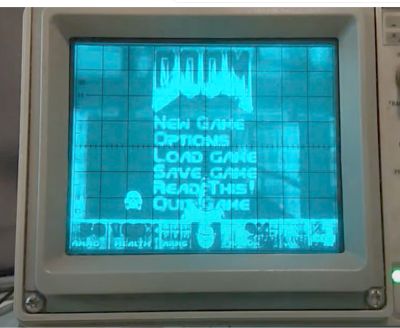
However, there is no one single way of implementing a video game on a scope. The approaches we’ve seen can depend on the particular operating system running the scope and particular features the scope implements. Here’s a rundown on the basics of what we’ve found.

One widely used approach to hacking digital scopes for games is to trick the scope into stopping the scope software and interacting with the scope operating system directly. Generally speaking, once you have control of the scope operating system, running Doom is the easy part.
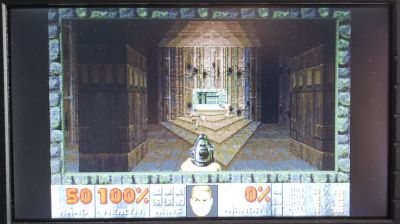
Doom on a scope
Doom II running on a DSOX1102G oscilloscope at 3 FPS under Windows CE.
Judging by posts from those who’ve done it, getting control of the scope operating system is tricky. A good example of what goes on concerns a now-discontinued Keysight scope called the DSOX1102G which runs the Windows CE OS. As detailed on Hackaday, user Jason Gin took about a year and half to get at the scope OS, a process that began when he purposely crashed the scope by leaving an external floppy drive plugged into the scope USB on startup. This revealed a display of a desktop. To use it, Gin devised a custom USB switch cable to rapidly toggle in the keyboard and mouse after a crash. Gin’s quest for control of the scope eventually included deleting a couple of Windows processes that would automatically reboot the scope after a crash. He created a batch file with all the commands required to kill the scope software, a startup folder handler, a crash handler; a routine to restore the taskbar and re-enable the Command Prompt. Gin says he eventually discovered the crash handler was the key to making the Windows CE desktop visible; he added some lines in his batch file to launch and subsequently kill the crash handler which let him (semi-)automatically boot the oscilloscope to the desktop, with just a USB drive, mouse and keyboard.

Another approach involves scopes that have not just the customary X and Y inputs, but also a Z input. The Z input controls the intensity of the trace. A point to note is that not all scopes have a Z input.
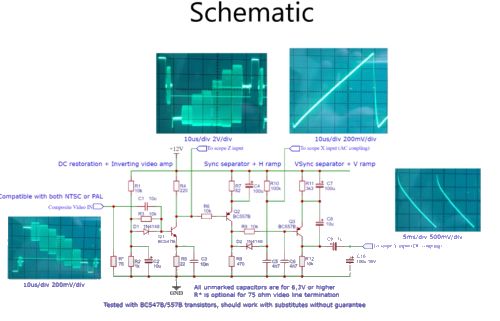
schematic
A circuit that converts composite video to XYZ mode for scope display.
In one case a YouTuber used a Tektronix 2220 digital scope with an XYZ display to show the Doom screen from the game that was running on a laptop. He managed this by devising a composite video-to-XYZ converter circuit. As a quick review, composite video is an analog video signal format that carries standard-definition video (typically at 525 lines or 625 lines) as a single channel, as well as line and frame synchronization pulses. The color video signal is a linear combination of the luminance of the picture and a modulated subcarrier which carries the chrominance or color information, a combination of hue and saturation. Details of the combining process vary between the NTSC and PAL schemes. The composite-to-XYZ converter circuit the YouTuber describes is said to work with either NTSC or PAL signals.

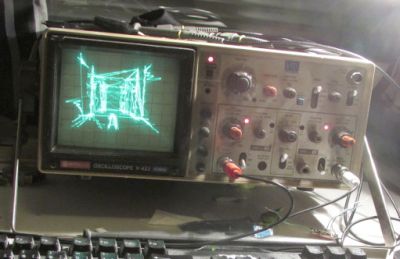
Quake rendered on a Hitachi V-422 scope.
A different approach to scene generation is possible on analog scopes: Generate scenes on a scope as vectors; the speed of the trace across the screen controls the intensity of the drawn lines. That’s the approach taken by Pekka Väänänen in a version of Quake he optimized for use on a Hitachi 422 analog scope. It’s clear from his blog posts that Väänänen knows a few things about rendering and visibility processing. He points out that two voltages specify the horizontal and vertical position of the ray on the scope, so varying these as a function of time allows the drawing of shapes. Basically he wrote a program that output a set of 2D points and viewed it in XY-mode on the oscilloscope. To draw line segments that are not connected together, he moved the ray quickly across the screen so it wouldn’t produce a visible line. This action takes place by spending more time drawing the visible lines and then scaling the monitor intensity accordingly to hide unwanted artefacts.

To actually generate the Quake graphics, Väänänen accessed the scene geometry in the game via a modified Quake engine source code called DarkPlaces. The engine was patched to save all the clip-space triangle edges sent for drawing, and then transferred to a synthesizer process.

The synthesizer spends time getting rid of duplicate and unseen line geometry because the time budget per frame is tight and time spent on redundant lines is wasted. Väänänen admits he’s not particularly happy with the resulting scenes–the stability and quality of the rendering leaves something to be desired. But he also says there’s room to improve the scene-generating algorithms.
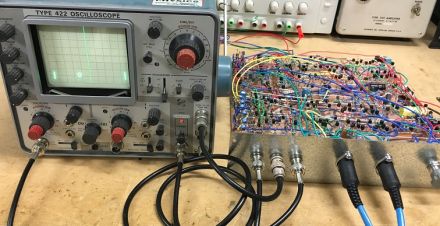

Pong
A Pong game display on a scope and the circuit that made it possible.
When it comes to Pong on a scope, it seems as though a lot of the efforts are part of undergrad lab projects. A typical approach is to generate signals displayed on the scope via analog circuits. The ball X and Y components can be generated using op amp RC integrators. The paddle Y component can be generated using a summing amplifier to add a sawtooth oscillator waveform on top of a dc offset controlled by the player. Digital components may be used to keep track of ball direction, who serves, and so forth. But for those who want a more detailed explanation, a post on the EEVblog site contains schematics and other details.

You may also like:

  • used oscilloscopes
    The case for buying a used oscilloscope
  • frequency you can count on
    Will 60 Hz continue to be a frequency you can…

  • June 2022 Special Edition: Test & Measurement Handbook
  • rental instruments
    The modern economics of renting test instruments
  • no you can't detect ghosts with a gauss meter
    No, you can’t detect ghosts with a gauss meter

Filed Under: FAQ, Featured, New Articles, oscilloscope measurements Tagged With: FAQ, hitachi, keysighttechnologies, Tektronix

Reader Interactions

Leave a Reply Cancel reply

You must be logged in to post a comment.

Primary Sidebar

Featured Contributions

Why engineers need IC ESD and TLP data

Verify, test, and troubleshoot 5G Wi-Fi FWA gateways

How to build and manage a top-notch test team

How to use remote sensing for DC programmable power supplies

The factors of accurate measurements

More Featured Contributions

EE TECH TOOLBOX

“ee
Tech Toolbox: Aerospace & Defense
Modern defense and aerospace systems demand unprecedented sophistication in electronic and optical components. This Tech ToolBox explores critical technologies reshaping several sectors.

EE TRAINING CENTER

EE Learning Center
“test
EXPAND YOUR KNOWLEDGE AND STAY CONNECTED
Get the latest info on technologies, tools and strategies for EE professionals.
bills blog

RSS Current Electro-Tech-Online.com Discussions

  • Ceramic capacitors voltage rating
  • What is involved to convert a small town to fiber optic?
  • How do I choose the right stepper motor for my DIY 3D printer?
  • What is this called and what was it for
  • high voltage

Footer

EE World Online Network

  • 5G Technology World
  • EE World Online
  • Engineers Garage
  • Analog IC Tips
  • Battery Power Tips
  • Connector Tips
  • EDA Board Forums
  • Electro Tech Online Forums
  • EV Engineering
  • Microcontroller Tips
  • Power Electronic Tips
  • Sensor Tips

Test & Measurement Tips

  • Subscribe to our newsletter
  • Advertise with us
  • Contact us
  • About us

Copyright © 2025 · WTWH Media LLC and its licensors. All rights reserved.
The material on this site may not be reproduced, distributed, transmitted, cached or otherwise used, except with the prior written permission of WTWH Media.

Privacy Policy