• Skip to primary navigation
  • Skip to main content
  • Skip to primary sidebar
  • Skip to footer
  • Advertise
  • Subscribe

Test & Measurement Tips

Oscilloscopes, electronics engineering industry news, how-to EE articles and electronics resources

  • Oscilloscopes
    • Analog Oscilloscope
    • Digital Oscilloscope
    • Handheld Oscilloscope
    • Mixed-signal Oscilloscope
    • PC-based Oscilloscopes – PCO
  • Design
  • Calibration
  • Meters & Testers
  • Test Equipment
  • Learn
    • eBooks/Tech Tips
    • FAQs
    • EE Training Days
    • Learning Center
    • Tech Toolboxes
    • Webinars & Digital Events
  • Video
    • EE Videos
    • Teardown Videos
  • Resources
    • Design Guide Library
    • Digital Issues
    • Engineering Diversity & Inclusion
    • Leap Awards
    • White Papers
  • Subscribe
You are here: Home / Oscilloscopes / Pico releases PicoScope 2200 compact USB Oscilloscopes

Pico releases PicoScope 2200 compact USB Oscilloscopes

February 25, 2011 By Test and Measurement Editor Leave a Comment

Pico Technology (www.picotech.com) has released its PicoScope 2200 Series of ultra-compact USB oscilloscopes, which feature an oscilloscope, arbitrary waveform generator and spectrum analyzer all in one affordable and powerful device.
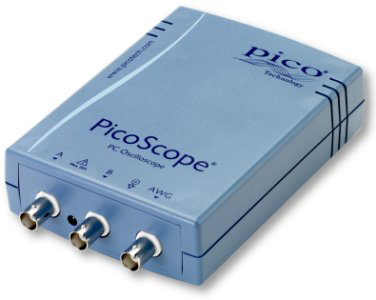
PicoScope-2200-Series-of-ultra-compact-USB-oscilloscopes

These compact oscilloscopes deliver the performance and features of other oscilloscopes that are several times their price and size. These oscilloscopes can also be conveniently taken anywhere, since they are small enough to fit in laptop bags.

The PicoScope 2200 dual-channel PC Oscilloscopes feature up to 200 megasamples per second real-time sampling rates, which can be increased using equivalent-time sampling to as much as 4 gigasamples per second in case of repetitive signals. The range’s high sampling rates combined with 25 MHz analogue bandwidth and 16,000 sample buffer memory make it ideal for use in various applications.

The scopes also eliminate the need for external power supply or batteries, as they obtain their power from the USB 2.0 interface. The scope’s USB port provides high-speed data to PC and delivers high-resolution and responsive display.

The PicoScope 2200 range of USB oscilloscopes are designed with similar software functions and features available in high-end oscilloscopes only, such as the PicoScope 6 software for Windows. This software allows easy saving of data in various formats including PNG and BMP images, CSV text and MATLAB binary files. It also features examples and drivers for C/C++, LabVIEW, Visual Basic and Delphi for integration into custom applications.

A click of a button in the scope allows users to shift from time domain to frequency domain and use the scope as a spectrum analyzer. Its full range of settings provides control over various spectrum bands, display modes and window types.

Filed Under: Oscilloscopes, PC-based Oscilloscopes - PCO Tagged With: oscilloscope, oscilloscopes, pico, usb oscilloscopes

Reader Interactions

Leave a Reply Cancel reply

You must be logged in to post a comment.

Primary Sidebar

Featured Contributions

Why engineers need IC ESD and TLP data

Verify, test, and troubleshoot 5G Wi-Fi FWA gateways

How to build and manage a top-notch test team

How to use remote sensing for DC programmable power supplies

The factors of accurate measurements

More Featured Contributions

EE TECH TOOLBOX

“ee
Tech Toolbox: Aerospace & Defense
Modern defense and aerospace systems demand unprecedented sophistication in electronic and optical components. This Tech ToolBox explores critical technologies reshaping several sectors.

EE TRAINING CENTER

EE Learning Center
“test
EXPAND YOUR KNOWLEDGE AND STAY CONNECTED
Get the latest info on technologies, tools and strategies for EE professionals.
bills blog

RSS Current Electro-Tech-Online.com Discussions

  • Solid State DC Circuit Breaker Breakthrough: First Applied to the New Generation of Railway Electric Locomotives
  • Ceramic capacitors voltage rating
  • What is involved to convert a small town to fiber optic?
  • How do I choose the right stepper motor for my DIY 3D printer?
  • What is this called and what was it for

Footer

EE World Online Network

  • 5G Technology World
  • EE World Online
  • Engineers Garage
  • Analog IC Tips
  • Battery Power Tips
  • Connector Tips
  • EDA Board Forums
  • Electro Tech Online Forums
  • EV Engineering
  • Microcontroller Tips
  • Power Electronic Tips
  • Sensor Tips

Test & Measurement Tips

  • Subscribe to our newsletter
  • Advertise with us
  • Contact us
  • About us

Copyright © 2025 · WTWH Media LLC and its licensors. All rights reserved.
The material on this site may not be reproduced, distributed, transmitted, cached or otherwise used, except with the prior written permission of WTWH Media.

Privacy Policy