• Skip to primary navigation
  • Skip to main content
  • Skip to primary sidebar
  • Skip to footer
  • Advertise
  • Subscribe

Test & Measurement Tips

Oscilloscopes, electronics engineering industry news, how-to EE articles and electronics resources

  • Oscilloscopes
    • Analog Oscilloscope
    • Digital Oscilloscope
    • Handheld Oscilloscope
    • Mixed-signal Oscilloscope
    • PC-based Oscilloscopes – PCO
  • Design
  • Calibration
  • Meters & Testers
  • Test Equipment
  • Learn
    • eBooks/Tech Tips
    • FAQs
    • EE Training Days
    • Learning Center
    • Tech Toolboxes
    • Webinars & Digital Events
  • Video
    • EE Videos
    • Teardown Videos
  • Resources
    • Design Guide Library
    • Digital Issues
    • Engineering Diversity & Inclusion
    • Leap Awards
    • White Papers
  • Subscribe
You are here: Home / Oscilloscopes / Handheld Oscilloscope / PicoScope 2104 handheld oscilloscope

PicoScope 2104 handheld oscilloscope

July 27, 2011 By Test and Measurement Editor 1 Comment

Pico Technology (www.picotech.com) has unveiled a portable handheld oscilloscope that is suitable for hobbyists, technicians, students and anyone in search for an affordable, easy-to-use, single channel PC oscilloscope — the PicoScope 2104.

Offering 10 MHz bandwidth, 50 MS/s maximum sampling rate, this new oscilloscope also delivers a memory of up to eight kS and a resolution of eight bits.

Ergonomically designed to perfectly fit the user’s hand, the 2104 oscilloscope is lightweight and comfortable to use, regardless if the user is right-handed, left-handed, or has small or big hands.

Although it comes in a compact and portable design, the oscilloscope still delivers the various powerful features found in traditionally larger oscilloscopes.

Eliminating the need for additional oscilloscope probes, power supplies, or complex installation procedures, the 2104’s plug-and-play technology enables users to conveniently plug the oscilloscope into a PC and start working at once.

Users can control the oscilloscope using its top button, which flashes a green light to indicate that it is running. The tip of the oscilloscope illuminates a beam of light to enable users to see the area being tested. When all the signals have been captured, pressing the button again will stop the oscilloscope, which will then reflect a red light.

The user can hold down the button to activate the oscilloscope’s auto setup function. This function automatically sets up the trigger configuration and timebase to display the signal found on the input.
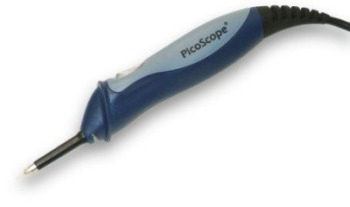
PicoScope 2104 also comes with various oscilloscope software that provide users the added functionality of spectrum analyzer as well as of a meter and data logger.

Filed Under: Handheld Oscilloscope, Oscilloscopes, PC-based Oscilloscopes - PCO

Reader Interactions

Comments

  1. THEODORE KARATZAS says

    April 10, 2013 at 2:32 pm

    Can I use the pico 2014,or2015 model for audio measurements and plots such as Frequency Responce , THD , THD+N ?

    Log in to Reply

Leave a Reply Cancel reply

You must be logged in to post a comment.

Primary Sidebar

Featured Contributions

Why engineers need IC ESD and TLP data

Verify, test, and troubleshoot 5G Wi-Fi FWA gateways

How to build and manage a top-notch test team

How to use remote sensing for DC programmable power supplies

The factors of accurate measurements

More Featured Contributions

EE TECH TOOLBOX

“ee
Tech Toolbox: Power Efficiency
Discover proven strategies for power conversion, wide bandgap devices, and motor control — balancing performance, cost, and sustainability across industrial, automotive, and IoT systems.

EE TRAINING CENTER

EE Learning Center
“test
EXPAND YOUR KNOWLEDGE AND STAY CONNECTED
Get the latest info on technologies, tools and strategies for EE professionals.
bills blog

RSS Current Electro-Tech-Online.com Discussions

  • ESP32-S3 started outputting NMEA GPS location frames after EMC disturbance — what mode is this?
  • TraxMaker Pro? I only have the non-Pro version. Looking for the Pro version that has the integrated pick and place coordinates export.
  • Can a small solar panel safely trickle-charge old NiMH AA batteries?
  • desoldering
  • Need a fresh eye on my first PCB

Footer

EE World Online Network

  • 5G Technology World
  • EE World Online
  • Engineers Garage
  • Analog IC Tips
  • Battery Power Tips
  • Connector Tips
  • EDA Board Forums
  • Electro Tech Online Forums
  • EV Engineering
  • Microcontroller Tips
  • Power Electronic Tips
  • Sensor Tips

Test & Measurement Tips

  • Subscribe to our newsletter
  • Advertise with us
  • Contact us
  • About us

Copyright © 2025 · WTWH Media LLC and its licensors. All rights reserved.
The material on this site may not be reproduced, distributed, transmitted, cached or otherwise used, except with the prior written permission of WTWH Media.

Privacy Policy