Keithley Instruments has developed a free app for Android™-based smartphones and tablets that interacts with a Keithley Series 2600B SourceMeter SMU instrument via its front panel USB interface. IVy, which is the industry’s first app developed for SMU instruments, extends Keithley’s Touch, Test, Invent® design philosophy to offer benchtop Series 2600B instrument users a fast, easy-to-use touchscreen tool for characterizing 2- and 3-terminal devices. By leveraging the power of smart mobile devices, IVy transforms the Series 2600B into a powerful instrument that enables users to visualize, interact, and share measurement results more efficiently, while helping them gain a deeper understanding of their devices behavior.
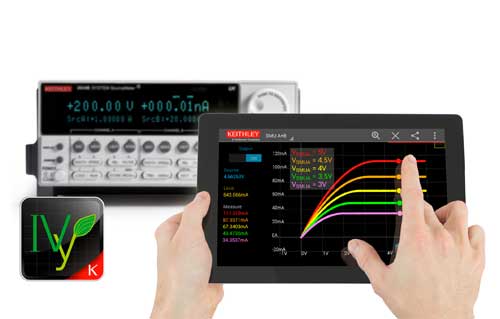
Unlike other instrument apps, IVy is more than just a tablet/smartphone version of a front panel. IVy leverages a smart device’s built-in display (pan/pinch/zoom/swipe), computing (interaction with the instrument), and communication (WiFi, email, etc.) capabilities so users can visualize measurement data, interact with the instrument, and share results easily — all without programming. Like all Keithley Touch, Test, Invent solutions, the IVy app is designed to help instrument users “learn faster, work smarter, and invent easier.” It helps users gain deeper insight into their device under test (DUT) performance by allowing them to toggle quickly between test modes, observe a DUT’s response over time, and analyze results interactively by using fingertip control. IVy is compatible with any Android (V 4.0 or later) smartphone or tablet and the latest release (V 3.1.0) of the Series 2600B firmware.
IVy’s patent-pending design provides for simultaneous control over the source level (using an on-screen slider) and monitoring of test results (on the smart device’s graphical display). This unique capability makes it easy to analyze I-V characteristics, DUT stability, response time, or drift in a circuit visually. Changes in DUT performance are reflected instantly on the graphical display, and further analysis or troubleshooting is simplified by pinching, zooming, or scrolling. IVy also simplifies the process of sharing test results by utilizing built-in smart-device capabilities such as cellular, WiFi, Bluetooth, email, or other apps such as Dropbox, Google Drive, and more. This capability can be invaluable when collaborating on a task or project.
The Keithley Series 2600B SourceMeter SMU instruments are available in both single- and dual-channel models that combine the capabilities of a precision power supply, true current source, 6½-digit multimeter, arbitrary waveform generator, pulse generator, and electronic load in one tightly integrated instrument. They offer industry-leading resolution (up to 0.1fA) and dynamic range (up to 3A or 200V).
Pricing and Availability
The IVy Android-based app will be available for download at no charge from Google play later this fall.
Keithley
www.keithley.com/ivy

Leave a Reply
You must be logged in to post a comment.