Touch technology is revolutionizing human interaction to complex devices providing faster, simpler, more intuitive user solutions. Touch technology is now available for coordinate measuring machines with the next generation of metrology software… TouchDMIS™.
CMM software’s have long been criticized for being too complex requiring long training periods and extended learning curves. TouchDMIS is a full-feature CMM software with intuitive touch interface, offering unparalleled user experience and benchmark CMM productivity.
Developed for both manual and CNC CMM’s, including portable arm CMMs, TouchDMIS is loaded with innovative and time saving features. Traditional CMM software’s provide access to functionality through complex systems of toolbars, dropdown menus and tedious window selections.
TouchDMIS offers a revolutionary user interface using smart technology, whereby next suggested functionality is dynamically presented for user confirmation, minimizing learning time to just a few hours with immediate productivity benefits. TouchDMIS represents a new and innovative presentation of software functionality for industrial metrology applications.

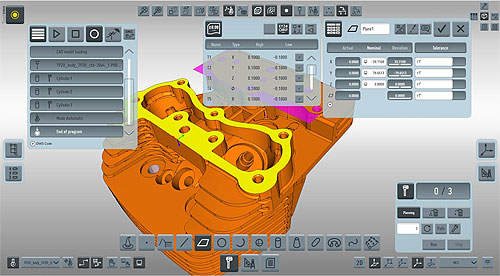
TouchDMIS has reduced traditional CMM software to just eight Function Buttons which, when selected, open the appropriate Function Window; the button is integral in the open window providing one touch re-docking. The 64 bit software maintains all windows live even when docked; the multi-threaded software uses Microsoft® WPF and Direct X® technologies.
All open windows offer ‘thru-view’ allowing sight of displayed graphics; in addition many windows offer the ‘flip button’ allowing for window flipping to display further advanced functions and capabilities for expert users. The software graphics area bleeds to the edge of the touch screen with all software buttons floating atop the graphics.
The Measurement Wizard automatically determines the feature under inspection, negating any user interaction and offering hands-free CMM inspection. Touch selection of graphically displayed measured features launches the Construction Wizard and displays all available legal metrology options from the selected features.

TouchDMIS integrates the ISO standard DMIS programming language and presents this complex high level CMM language in a simple readable block format, negating the need for users to interact directly with the DMIS language code. TouchDMIS can utilize DMIS programs from older generations of DMIS-based CMM softwares, providing a migration path and full CMM program interoperability.
Touching any software input field launches the virtual keypad, offering Smart-Phone productivity on the CMM. Tolerancing measured features is achieved with a single touch from the Tolerance Table; ISO tolerances are also available.
TouchDMIS graphics offer a rich representation of measurement actions, offering an intuitive and informative guide to measuring tasks. The CMM Touch & Drag Disc allows go-to-path motion to be programmed and individual touch points adjusted within a measured feature. Full-part program simulation with motion path simulation; collision detection and the complete virtual Renishaw Probe library adds to the virtual program prove-out experience.
CAD has traditionally added further complexity to CMM software’s. The optional TouchCAD module of TouchDMIS simplifies CMM programming when using CAD data and introduces touch-screen manipulation of the CAD model using gesture commands. CAD entities are selected from the model with a single touch. Step and IGES files are imported as standard and native CAD geometry import from all popular formats is also available.
TouchDMIS offers a choice of Inspection Reporting functions include Blueprint Reporting, traditional analytical and graphical reporting as well as SPC, Excel® and XML outputs.
Blueprint Reporting is a unique shop-floor friendly method of creating intuitive reports that correlate to the original part Blueprint. The screen displays a graphical representation of inspected part features; dimensions can be touch extracted from the graphics and displayed in blueprint format providing a DNA blueprint of the actual measured parts with colored G D & T, indicating feature status.
TouchDMIS is available as an upgrade to existing coordinate measuring machines or on new’s through OEM partnerships. Live presentations of TouchDMIS are available through the website.
Next Metrology Software
www.touchdmis.com

Leave a Reply
You must be logged in to post a comment.